
35 events found.
Calendar of Events
Latest Past Events
Mastercam Multiaxis – Online Training Class
OnlineThis class will be taught in English. Fill out the form to request a spot! For more information on the class, click HERE to review the course outline.
Mastercam Mill 2D – Online Training Class D (Days 3-4)
OnlineThis class will be taught in French. Fill out the form to request a spot! For more information on the class, click HERE to review the course outline.
Mastercam Mill 2D – Online Training Class D (Days 1-2)
OnlineThis class will be taught in French. Fill out the form to request a spot! For more information on the class, click HERE to review the course outline.
You know if there is some book in spanish about this. I can not find it. Thank you
Hello Jose,
Unfortunately there is no Spanish version of this book currently.
saludos
estoy interesado en lo videos y libros, pero posteriormente lo solicitare, lo pagare con tarjeta visa.
Good day Walter,
Our books and videos can be purchased from our sister website http://www.emastercam.com/store whenever you’re ready. Payment with visa is not a problem.
Happy programming,
The In-House Solutions Team
This is awesome!!! I’m so glad you guys have developed a curriculum based on and promoting STEM!!
Thank you!
Will Slota
Educational Applications Engineer
CNC Software, Inc.
Hi, I like to know if it possible to get the multi axis bundle and get the lathe book only. I have the Mill 1 and 3.
If it is easier please contact me directly via email.
Thank you
Macin
Hi Marcin, thanks for the question. The books you mention are available separately at http://www.eMastercam.com/store. Keep in mind that bundle pricing only applies to the bundles as outlined in this blog post.
Hello,
I work in micromachining and I am currently using X8. As much as I like the direction that Mastercam is going, it seems that the verify is becoming a pain graphics wise. I have learned several ways to work around this like accurate zoom, adjusting tolerances, or just creating stock models per operations. I came across the verify settings- precision factor from changing the current 1 to a 2.5 or even a 4. My issue is that when surfacing, it looks like sh_t. I can work around it, but I want this to work in real time for me. My computer is a Dell Precision T3600. Intel(R) Xeon(R) CPU E5-1650 @3.20 GH 16.0 GB 64 BIT. My graphics card is a NVIDIA Quadro K5000. What would you recommend for me so I can run the setting at 2.5 or even 4 so I can verify without having an ocd of constantly changing settings. Or what more do I need to put into my computer, remember that all my parts are about 5mm down to .200 microns. Please help!!
Hi Shane,
Thanks for the inquiry.
Are you able to send me a typical file that you work with? I can then test out the issue on a number of different computers here at the office and provide some suggestions accordingly.
[email protected]
how to set up right angle head in mastercam x7
Good Morning Sam,
Setting up a right angle head in Mastercam require a post modification. If you would like to inquire about doing this please send an email to [email protected]
Thanks,
Hello. We are running into the exact same problem as Shane. I’m running very similar hardware. Were you able to find an answer for this problem?
Hi Daniel,
No sorry, we never received a file from Shane. Are you able to send one that we can test?
X8 does not allow to a file to be saved with a solid rolled back, this is a step backwards! The ability to save a rolled back solid as an stl.file was useful for creating stock files which can be used in other softwares such as Vericut. I now need to duplicate a solid then delete solid operations to create stock files. In Mastercam, any changes to the primary model then need to be duplicated to the secondry model. As well as being time consuming it would be easy to make a mistake.
Can Mastercam be reverted to address this?
Hi Richard,
Thanks for the comment. I’m afraid I don’t completely understand the question/issue with regards to “rolling back a solid”. If you would like to call in to our office, we could certainly do our best to help.
WHICH IS THE EXECUTABLE EXE OF MASTERCAM X 8, THANKS
Hi Rafael,
If you have already installed Mastercam, you can find the exe file in the C:\Program Files\mcamX8 folder. The executable is called Mastercam.exe. If you have not installed Mastercam, please visit Mastercam.com and navigate to the downloads page.
Thanks for finally writing about >Mastercam eCourses – Available Now!
– In-House Solutions <Liked it!
We’re glad you liked them, thanks for letting us know!
Thank you!
Thanks for the tutorial, its useful.
how can you get a composite position on verisurf 7?
Hi Manny,
This type of callout can be constructed using the Note function under the MBD tab in Verisurf.
I need to get the composite position of five holes in relationship to each other how can I do this in verisrf7?
Hi Manny,
If you are an In-House Customer, call our support team and we can help you get that sorted out. Or you can call or email Verisurf support at [email protected] 888-713-7201
Hi am interested in talking a mastercam classes could you be of help
Hi Bernard,
If you are in Canada we have many training options available:
https://www.mastercam.ca/training/
eMastercam is also a valuable resource for training solutions. You may be interested in our eCourses:
http://www.emastercam.com/board/store
Im a student using Mastercam x9 to dynamic mill some stock but im getting an error message “an open avoidance region was detected”
How do i correct this?
Hi Volney,
“An open avoidance region was detected” means you need to close the geometry used to define the avoidance region.
Also, a student using Mastercam x9 and I’m having a similar issue, and your comment on there being geometry in need of being closed confuses me. If the geometry is open wouldn’t you not be able to chain it. I have searched for whatever is open but to no avail. Thanks in advance. 🙂
Hi Lorenzo,
Mastercam has no way of calculating this, there are too many different possibilities as this is required to work for basic to extremely complex parts. The closed chain is required to be able to select geometry.
In order to close the chain, you need to use trim two entities, you might need to delete duplicate entities, or delete overlapping entities. (use c-hook findoverlap)
hi
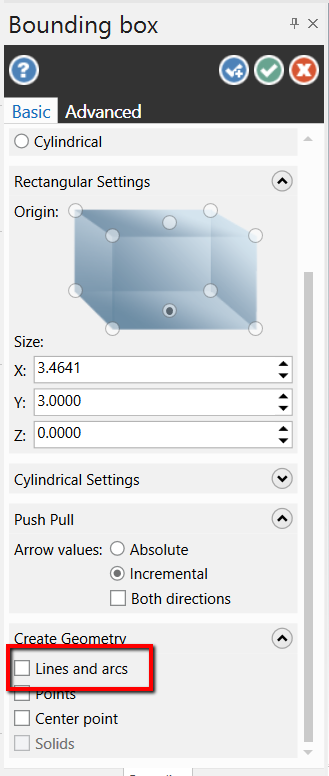
i am a student i am working on x9.i made a stock boundary but i can not see it.what should i do to see it on screen may be a color problem ?
let me know please
thanks
Hi Khan,
If you want entities when creating the boundary:
If you just want the stock to show:
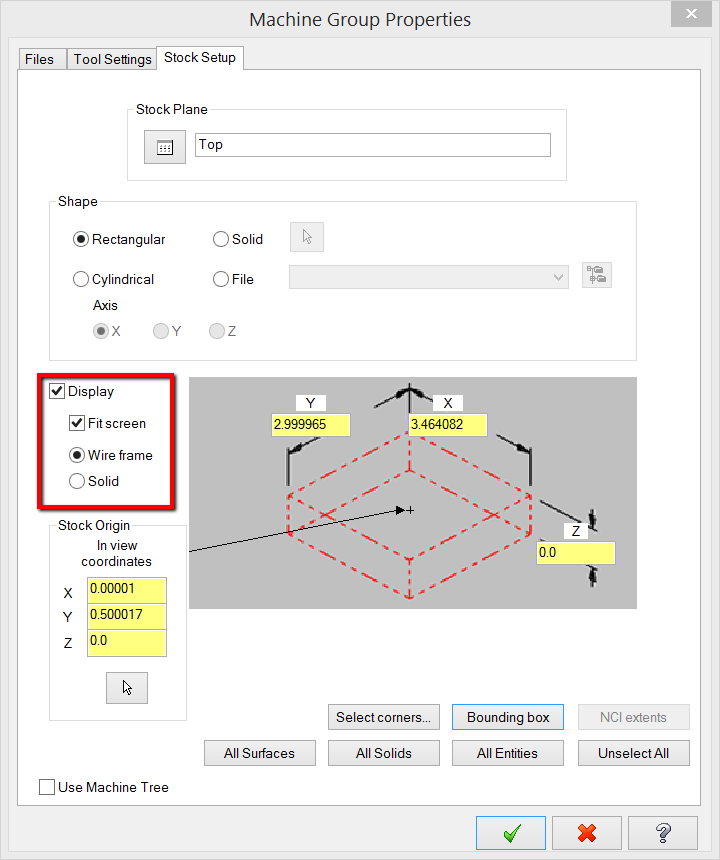
Hope this helps!
is there a cost to this workshop?
Hi Ian,
There is no cost to this, it’s free!
How to fix ,the system say No SIM Found …
iwant the whole masterx9 book , we have25to 40 off
Stanley, our sale was for December only. If you stay tuned to our blog or follow eMastercam on Facebook, new sales are announced there. https://www.facebook.com/emastercam/
We are huge fans of 3d printing in education. Our 3d printing company actually has plans to have an entire section just for education for students and schools.
Excellent webinar, one can always pic up new tips from these webinars, looking forward to see follow up ones.
Thanks Inhouse.
Nice post Keep Posting
how to turn on TRU SPINDLE COOLANT on in program for mastercam x8
thank
hai
My husband loves machines. Any kind he thinks is fascinating and loves to learn more about the different kinds that there are. It was interesting to learn about Roelf and his entrepreneurial roots. Machines can do a lot of things!
What filter settings you use for roughing toolpath?
Where is the link to download that additional mastercam .exe file?
First time I installed the demo, it told me it was already expired!
Very bad!
Hello.
I am writing you to ask about log in to your website.
I had my user name and try to log in house solution but i can not.
Coul you check what problems in my account?
I want to buy Multy Axis advance course of book.
I look forward to your response.
Best regards.
Hi, have you tried your login on http://www.emastercam.com? That is where all these books can be purchased.
Surprised no one has responded yet. Access to the Mastercam Home Learning Edition/Demo Software, how long will it last? Is there a monthly fee for software access?
Hello Colin,
The Mastercam HLE/Demo software for 2017 will last until summer of 2018. The 2018 version will last until the summer of 2019. There is no fee for using the HLE, it is included free of charge will all of our books, ebooks, ecourses, and the sitewide subscription. Once you have it installed you can continue to use it for free until the expiration date.
Marina,
Thank you for such a great job. You really have done more than you may think. You help teach and inspire many to grow in there lives of this industry.
My hat is off to you.
Thank you again.
Is there finally an easier, more effective licensing update?
Or we still using a NETHASP!? blugh….